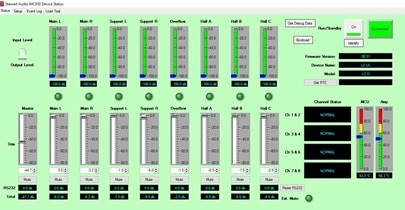
All these functions are easily configured and displayed via an intuitive, uncluttered, graphic-driven PC application. Windows 7 or higher operating system is required. A wired or wireless connection to the network can be used.
Stewart Audio has released firmware version 0.50 for the MC850 on January 30, 2019. It is to be used with MC850 Control and Reporting Application software version 1.0.3.8. You can check the current firmware version of your hardware on the system screen of the MC850 Control and Reporting application (MC850 C&R app). You can also check the current application version by selecting Program tab and About… from the dropdown menu.
Both a firmware (device) and application software (PC) are needed, and should be done at the same time, since the application and firmware are not compatible with previous versions. The device firmware (.hex) file is downloaded by clicking here.
To update the device firmware, start the MC850 Control and Reporting application and select the devices to be updated on the system screen by clicking the checkbox. Then select “Update Firmware on Selected Devices” from the System drop-down menu. This will open a file selection window. Navigate to the location of the downloaded MC850 Firmware App V050 01-21-19.hex file and select it. Click “open” to start the upgrade process. All selected amplifiers will be sequentially upgraded.
To install the new PC application, download version 1.0.3.8 of the C&R appliaction from the above link. If you have a previous version of the MC850 C&R application on your PC, uninstall it before installing the new version. Then double click the previously downloaded installer.